 Author
 |
Topic: Direct3D 11 example in BB4W (Read 1374 times) |
|
Michael Hutton
Developer
member is offline


Gender: 
Posts: 248
|
 |
Re: Direct3D 11 example in BB4W
« Reply #4 on: Jul 31st, 2015, 2:56pm » |
|
A lot of this has already been done in 2010.
Code:
           REM ****************************************************************
      REM
      REM Create a DirectX11 Device
      REM
      REM ****************************************************************
      DEF PROC_Init_D3D11(hwnd%)
      INSTALL @lib$ + "DirectX11\Functions\DLL"
      INSTALL @lib$ + "DirectX11\Functions\Helper"
      CALL @lib$ + "DirectX11\Constants"
      CALL @lib$ + "DirectX11\Structures"
      CALL @lib$ + "DirectX11\Interfaces"
      PROC_Helper_AssembleFNf

      REM Get the Dlls and the functions we need
      D3D11DLL%                       = FN_DLL_LoadDLL("D3D11.DLL")
      D3D11CreateDeviceAndSwapChain%  = FN_DLL_GetFunctionAddress(D3D11DLL%, "D3D11CreateDeviceAndSwapChain")
      D3DX11DLL%                      = FN_DLL_LoadDLL(FN_GetD3DX11DLL)
      D3DX11CompileFromFile%          = FN_DLL_GetFunctionAddress(D3DX11DLL%, "D3DX11CompileFromFileA")

      REM Create our swap chain description{}
      LOCAL scd{}
      DIM scd{} = DXGI_SWAP_CHAIN_DESC{}

      REM Fill out its members
      scd.BufferCount%       = 1
      scd.BufferDesc.Width%  = SCREENWIDTH
      scd.BufferDesc.Height% = SCREENHEIGHT
      scd.BufferDesc.Format% = DXGI_R8G8B8A8_UNORM
      scd.BufferDesc.RefreshRate.Numerator% = 60
      scd.BufferDesc.RefreshRate.Denominator% = 1
      scd.BufferUsage% = DXGI_USAGE_RENDER_TARGET_OUTPUT
      scd.OutputWindow% = hwnd%
      scd.SampleDesc.Count% = 4
      scd.SampleDesc.Quality% = 0
      scd.Windowed% = _TRUE
      scd.Flags% = DXGI_SWAP_CHAIN_FLAG_ALLOW_MODE_SWITCH

      REM Create the device
      SYS D3D11CreateDeviceAndSwapChain%, 0,               \
      \                                   D3D_DRIVER_TYPE_HARDWARE,  \
      \                                   0,               \
      \                                   0,               \
      \                                   0,               \
      \                                   0,               \
      \                                   D3D11_SDK_VERSION ,             \
      \                                   scd{},            \
      \                                   ^SwapChain%, \
      \                                   ^Device%,   \
      \                                   0,                 \
      \                                   ^DeviceContext%       TO R%
      IF R% PROC_D3DERR(R%) ELSE IF V% PRINT"Device Created."
      PROC_Helper_CreateInterface(IDevice{}, ID3D11Device{}, Device%)
      PROC_Helper_CreateInterface(ISwapChain{}, IDXGISwapChain{}, SwapChain%)
      PROC_Helper_CreateInterface(IDeviceContext{}, ID3D11DeviceContext{}, DeviceContext%)

      REM Get the address of the back buffer
      SYS ISwapChain.GetBuffer%, SwapChain%, 0, IID_ID3D11Texture2D{}, ^pBackBuffer% TO R%
      IF R% THEN ERROR 100,"Error : swapchain->GetBuffer : "+STR$~R%

      REM Use the BackBufferAddress to create the Render Target
      SYS IDevice.CreateRenderTargetView%, Device%, pBackBuffer%, 0, ^BackBuffer% TO R%
      IF R% THEN ERROR 100,"Error : Couldn't Use the BackBufferAddress to create the Render Target"

      REM Release the BackBuffer pointer
      SYS !(!pBackBuffer% + 8), pBackBuffer%

      REM OMSetRenderTargets : Returns Void
      SYS IDeviceContext.OMSetRenderTargets%, DeviceContext%, 1, ^BackBuffer%, 0

      REM Set the viewport
      DIM vp{} = D3D11_VIEWPORT{}
      vp.Width%    = FNf(SCREENWIDTH)
      vp.Height%   = FNf(SCREENHEIGHT)
      vp.TopLeftX% = 0
      vp.TopLeftY% = 0
      SYS IDeviceContext.RSSetViewports%, DeviceContext%, 1, vp{}

      ENDPROC

      REM ****************************************************************
      REM
      REM Closes DirextX11 and releases all the Objects created
      REM
      REM ****************************************************************
      DEF PROC_Close_D3D11(D%)
      PRINT'
      REM switch to windowed mode
      SwapChain% += 0
      IF SwapChain% THEN
        SYS ISwapChain.SetFullscreenState%, SwapChain%, 0, 0
      ENDIF

      REM Release Roger!
      REM Release all our objects
      IF FN_Helper_Release(VertexShader%)  = 0 IF V% PRINT"VertexShader released."
      IF FN_Helper_Release(PixelShader%)   = 0 IF V% PRINT"PixelShader released."
      IF FN_Helper_Release(BackBuffer%)    = 0 IF V% PRINT"BackBuffer released."
      IF FN_Helper_Release(SwapChain%)     = 0 IF V% PRINT"Swapchain released."
      IF FN_Helper_Release(Device%)        = 0 IF V% PRINT"Device released."
      IF FN_Helper_Release(DeviceContext%) = 0 IF V% PRINT"DeviceContext released."

      REM Release our dlls
      IF FN_DLL_FreeDLL(D3D11DLL%) IF V% THEN PRINT"D3D11.DLL Freed."
      IF FN_DLL_FreeDLL(D3DX11DLL%) IF V% THEN PRINT"D3DX11.DLL Freed."
      ENDPROC

      DEF FN_Helper_Release(RETURN O%)
      LOCAL R%
      O% += 0 : IF O% THEN SYS !(!O%+8), O% TO R%
      =R%

      REM ****************************************************************
      REM
      REM DirextX11 Error handling
      REM
      REM ****************************************************************
      DEF PROC_D3DERR(E%)
      D3DERR_INVALIDCALL           =          FN_MAKE_D3DHRESULT(2156)
      D3DERR_WASSTILLDRAWING       =          FN_MAKE_D3DHRESULT(540)

      ENDPROC

      DEF FN_MAKE_D3DHRESULT(C%)
      =FN_MAKE_HRESULT(1, &876, C%)

      DEF FN_MAKE_D3D10_HRESULT(C%)
      =FN_MAKE_HRESULT(1, &879, C%)

      DEF FN_MAKE_D3D11_HRESULT(C%)
      =FN_MAKE_HRESULT(1, &87C, C%)

      DEF FN_MAKE_HRESULT(S%, F%, C%)
      =(S%<<31) OR (F%<<16) OR C%
I have all the libraries needed at the moment. Of course, they could probably be updated.
If there is sufficient interest I could upload them.
Michael.
|
|
|
|
rtr2
Guest
|
|
Re: Direct3D 11 example in BB4W
« Reply #5 on: Jul 31st, 2015, 4:50pm » |
|
on Jul 31st, 2015, 2:56pm, Michael Hutton wrote:| A lot of this has already been done in 2010. |
|
You said in another thread: "I only have a 'starter file', basically getting a device going" so it would seem that in fact you didn't even get as far as the degree of functionality in the code that I posted this morning. That may not do much, but at least there's something to see!
What I am specifically doing is translating the Microsoft tutorials (there are others out there, but they seem to take bigger steps and in some cases you need to pay a subscription before you get to the end!). When I eventually put the code on the Wiki I want to be able to cross-reference those tutorials, where there is much more detail.
In any case I want to understand this stuff to a degree that I can provide support to other users, and there's no better way than doing it myself.
So thanks, but no thanks.
Richard.
|
|
 Logged Logged
|
|
|
|
rtr2
Guest
|
|
Re: Direct3D 11 example in BB4W
« Reply #6 on: Jul 31st, 2015, 9:16pm » |
|
on Jul 31st, 2015, 09:24am, g4bau wrote:| What I propose to do, if there is sufficient interest, is to publish a series of Direct3D 11 articles based directly on the Microsoft tutorials |
|
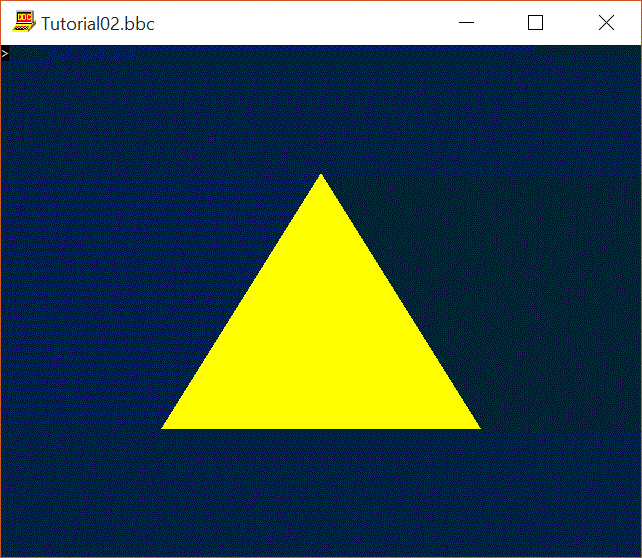
Making good progress: today I've managed to get Tutorial 2 running (admittedly it didn't work first time). The code is too long to list here (and needs to be tidied up before public consumption) but as evidence here is a rendered triangle. I know it's not rocket science, but it takes nearly 300 lines of code to achieve it in DirectX 11!
Edit: I should add that I've departed from the tutorial code slightly in order to avoid the D3DX issue. I'm using the D3DCompiler DLL, which comes as standard with Windows 8.1/10 and which is in any case legally redistributable.
Richard.
|
| « Last Edit: Jul 31st, 2015, 10:33pm by rtr2 » |
Logged
|
|
|
|
rtr2
Guest
|
|
Re: Direct3D 11 example in BB4W
« Reply #7 on: Aug 1st, 2015, 9:24pm » |
|
|
|
Logged
|
|
|
|
Torro
New Member
member is offline

Posts: 25
|
|
Re: Direct3D 11 example in BB4W
« Reply #8 on: Aug 2nd, 2015, 10:00pm » |
|
Are these directx11 hlsl tutorials usefull? http://rastertek.com/tutdx11.html
|
|
Logged
|
|
|
|
Torro
New Member
member is offline
Posts: 25
|
|
Re: Direct3D 11 example in BB4W
« Reply #9 on: Aug 4th, 2015, 10:12am » |
|
Have the direct x 11 tutorials code been uiploaded some where?
The Directx11 header files? Library?
|
|
Logged
|
|
|
|
DDRM
Administrator
member is offline
Gender:
Posts: 321
|
|
Re: Direct3D 11 example in BB4W
« Reply #10 on: Aug 5th, 2015, 2:49pm » |
|
Richard has now posted the D3D11 tutorials, and a link to a zip with all the supporting files, on the wiki:
http://bb4w.wikispaces.com/Direct3D+11+Tutorials
Best wishes,
D
|
|
Logged
|
|
|
|
DDRM
Administrator
member is offline
Gender:
Posts: 321
|
|
Re: Direct3D 11 example in BB4W
« Reply #11 on: Aug 6th, 2015, 3:34pm » |
|
...and now the 7th tutorial, and updated library etc files, are available at the wiki.
D
|
|
Logged
|
|
|
|
Torro
New Member
member is offline
Posts: 25
|
|
Re: Direct3D 11 example in BB4W
« Reply #12 on: Aug 10th, 2015, 5:53pm » |
|
windows 10 come s with directx 11.3 a higher level version of directx12
|
|
Logged
|
|
|
|
|





